How to Host a Live Quiz Game: A Step-by-Step Guide
Guides · 7 min read
Guides
A live quiz is one of the easiest ways to wake up a classroom, a team meeting or a party. One screen everyone can see, a phone in every hand, and a race to answer first. Here is exactly how to run one from start to finish.
The format is simple: questions appear on a big shared screen, and every player answers on their own phone. The faster you answer correctly, the more points you score, and a leaderboard keeps everyone competing between questions. Nobody installs anything — players just open a web page and type in a code. Below is the whole process, step by step.
Build your quiz (or let AI do it)
Every game starts with a set of questions. You can write them yourself, but the fastest route is to hand the work to AI: give it a topic, a page of notes, a web page, a PDF or a YouTube video, and get a full draft quiz back in seconds. Then you edit — fix a question, swap an answer, drop a picture in — until it is exactly what you want.
Keep a live game shorter than you think: eight to twelve questions is a sweet spot. Long enough to feel like a proper contest, short enough that nobody drifts off before the final scores.
Mix up your question types
A game of twelve identical multiple-choice questions gets stale fast. Vary it: a couple of quick true/false questions to build momentum, an open-answer question where players type the response themselves, an image or video question, and a Puzzle Race to shake things up. Drop in a double-points question near the end and watch the leaderboard swing — it keeps everyone in the game right to the finish.
Start the game and show the PIN
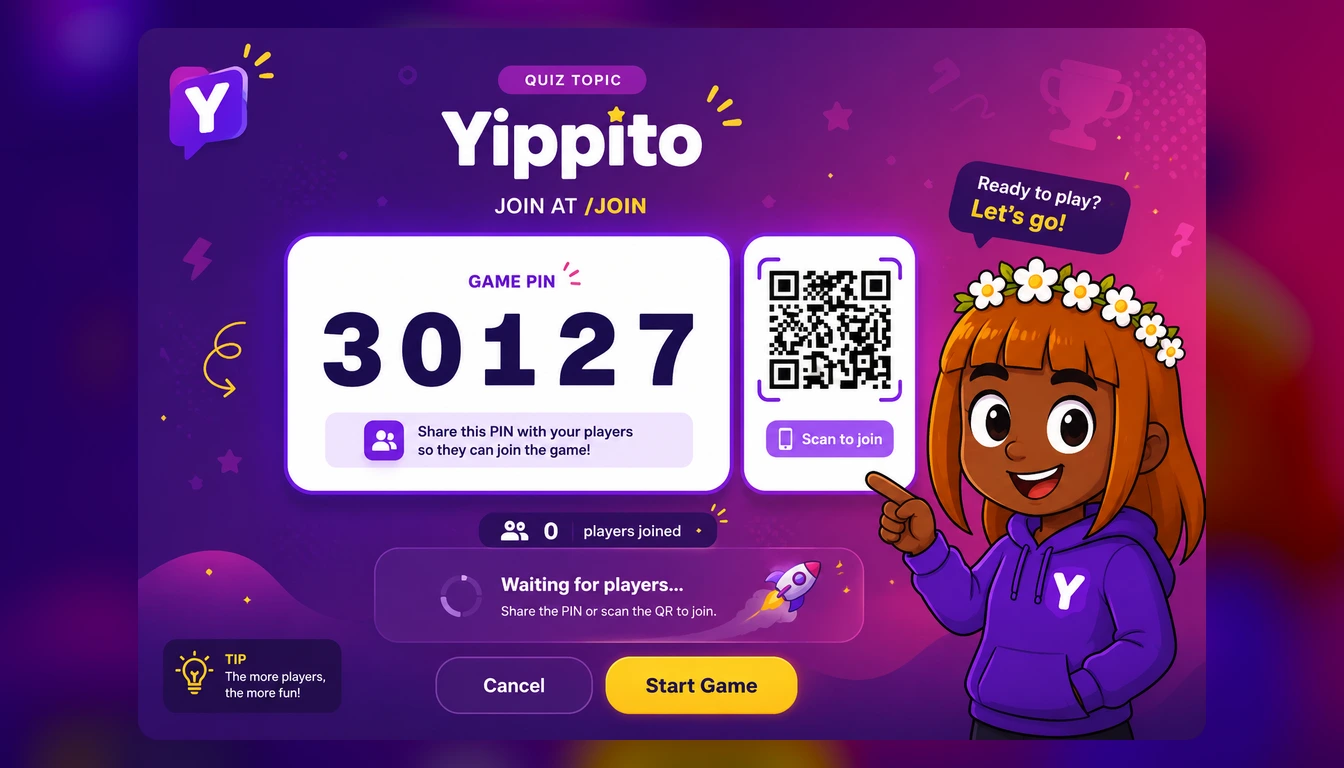
When you are ready, start a live game. Your screen — the one you will project or share — displays a five-digit game PIN and a QR code. This is the “host” view: it shows each question, a countdown, the answer options, and the leaderboard between rounds. Put it somewhere everyone can see: a projector, a classroom smartboard, or a shared screen on a video call.
Players join on their phones
Players go to the join page and either type the five-digit PIN or scan the QR code straight from the big screen. They pick a nickname and an avatar, and they are in — no account, no app, no download. Their name pops up on the host screen as they arrive, which is a nice moment of anticipation while you wait for everyone.
No app, no sign-up, no faff. A code, a nickname, and everyone is playing within seconds.
Play through the questions
Once everyone is in, you kick off the first question. It appears on the big screen; the answer options appear on each phone. Players tap their choice, and speed matters — a correct answer scores more the faster it comes in. After each question, the screen reveals the right answer and an updated leaderboard, so there is a little burst of drama every round.
As host, you control the pace. Give a beat after each reveal for the groans and cheers, then move on. That rhythm — question, answer, leaderboard, next — is what makes a live quiz feel like an event rather than a test.
Crown the winner
After the last question, the final leaderboard goes up and you have a winner. This is the payoff, so make a moment of it — the podium is the reason half the room was trying so hard. From here you can play again, start a fresh game, or review how everyone did.
Quick tips for a smooth game
Test your screen first. Make sure whatever you are projecting is big and readable from the back of the room before players arrive.
Ask people to have their phones ready.A quick “get your phones out and go to the join page” at the start saves a few minutes of fumbling.
Read the room on pace. A lively group can go fast; a class working through tricky material needs longer per question. You are the conductor.
Use the leaderboard. Call out the top few names between questions. A little commentary turns a quiz into a show.
Ready to host your first one?
You do not need any special equipment — a screen everyone can see and phones in the room are enough. With Yippito you can generate a quiz from any topic, start a live game, and have a room full of people playing on their phones in a couple of minutes. Build one this afternoon and try it on your next class, meeting or games night.
Host your first live quiz.
Make a quiz, share the PIN, and let everyone join on their phones.
Try it free